
RenoAI vs RoomGPT: Which AI Interior Design Platform Is Better in 2026?
AI interior design platforms are making it easier to explore room ideas before investing in furniture, materials, detailed modelling, or renovation work. Upload a photograph, select a design direction, and the platform can generate a new visual interpretation of the space.
RoomGPT helped make this process accessible through a simple photo-based room redesign experience. The platform describes itself as a personal AI interior designer and reports that more than four million people have used it to redesign their homes.
RoomGPT primarily appeals to users who want to visualize an existing room in a different theme without navigating a complex design workflow.
RenoAI expands this idea into a broader design visualization platform. Users can create concepts for interiors, exteriors, landscapes, and commercial environments from room photographs, sketches, floor plans, elevations, CAD drawings, and 3D model screenshots. The platform also includes tools for changing furniture, wall colours, lighting, clutter, image quality, and overall design styles.
This RenoAI vs RoomGPT comparison examines the documented capabilities, customization options, ideal users, and limitations of both platforms. The objective is to help homeowners, interior designers, architects, and property professionals choose the right tool for their requirements.
RenoAI vs RoomGPT: A Quick Comparison
Both platforms can turn an existing room photograph into a redesigned visual. Their primary difference lies in how far users can take that initial idea.
| Comparison area | RenoAI | RoomGPT |
|---|---|---|
| Primary use | Broader space design and visualization | Quick room redesign from a photograph |
| Supported inputs | Photos, text, sketches, floor plans, elevations, sections, CAD drawings, and 3D model screenshots | Room photographs |
| Space categories | Interiors, exteriors, landscapes, and commercial spaces | Interior rooms |
| Customization | Style, colour, layout, furniture, walls, lighting, clutter, and image enhancement | Theme-based room transformations |
| Professional applications | Concept exploration, architectural visualization, client presentations, and renovation previews | Quick inspiration and early room concepts |
| Mobile availability | Web, iOS, and Android | The official platform currently promotes a web-based experience |
| Free access | Free starter credits without a credit card | One free generation after signing in with Google |
| Output type | AI-generated design concepts | AI-generated design concepts |
How Do RenoAI and RoomGPT Work?
RoomGPT follows a focused workflow. Users upload a photograph of an existing room and generate a new visual interpretation of that space. It can transform any room from a single photograph and view the room in different themes.
This streamlined process is useful when someone wants a quick answer to a simple question: What could this room look like in a different style?
RenoAI also supports photo-based room redesign, but it offers more ways to define and develop the concept. Users can select the room type, style, colour direction, and layout before generating a visual. They can then use targeted tools to explore furniture changes, wall finishes, lighting, decluttering, and other visual adjustments.
The workflow can also begin without a finished room photograph. RenoAI’s AI visualization tools can generate concepts from written ideas, sketches, floor plans, elevations, sections, CAD drawings, and 3D model screenshots.
RoomGPT is therefore centered on fast photo transformation. RenoAI supports that same starting point while extending into a wider range of design and architectural visualization tasks.
Read More: From Scan to Render: The Smarter Way to Present Properties with AI
What Can You Create With RenoAI and RoomGPT?
RoomGPT is designed to reimagine an existing interior from a photograph. It can help homeowners, renters, and design enthusiasts explore how a room may look in another theme before changing its décor.
The platform’s simplicity is part of its appeal. A user does not need to prepare a technical drawing or build a 3D model before exploring an idea.
RenoAI supports quick room transformations alongside a broader collection of creation modes:
- Text to Render
- Sketch to Render
- Floorplan to Render
- 3D Model to Render
- Elevation to Render
- Section to Render
- Image to Render
- CAD to Render
- Landscape Design
- Image Upscaling
These tools can support different stages of a project. A homeowner can redesign a room photograph, while an interior designer can visualize a sketch or floor plan. An architect can develop an exterior concept from an elevation or refine a 3D model screenshot for a presentation.
RenoAI also includes complete room makeovers, furniture addition and removal, wall-colour changes, lighting optimization, photo enhancement, decluttering, camera-angle consistency, custom styles, and regional luxury presets.
These outputs should be treated as visual concepts. Neither platform replaces measured drawings, material specifications, working drawings, CAD or BIM coordination, regulatory checks, or professional design review.
Read More: AI Rendering vs Traditional Rendering
Is RenoAI Better Than RoomGPT?
RenoAI offers a broader set of design capabilities than RoomGPT, but the better platform depends on what the user wants to accomplish.
RoomGPT may be the more suitable option for someone who wants to upload one photograph and quickly explore a different room theme. Its focused workflow reduces the number of choices a user must make.
RenoAI is the stronger option when the project requires:
- More than a basic room makeover
- Multiple source formats
- Interior and exterior visualization
- Targeted furniture or surface changes
- Lighting and decluttering tools
- Custom style exploration
- Architectural concept development
- Visuals for client discussions
The key difference is workflow depth. RoomGPT focuses on the initial transformation. RenoAI allows users to begin with different types of design inputs and continue refining particular visual elements.
For casual inspiration, RoomGPT’s simplicity can be valuable. For wider renovation, visualization, and professional design requirements, RenoAI provides more documented functionality within one platform.
What Is the Best Alternative to RoomGPT?
RenoAI is a strong RoomGPT alternative for users who want more customization, additional input formats, and support for spaces beyond residential interiors.
Someone looking for an alternative should first identify what RoomGPT does not cover for their particular project.
RenoAI may be more suitable when users want to:
- Convert a sketch into a realistic visual
- Visualize a floor plan or CAD drawing
- Develop a façade from an elevation
- Refine a screenshot from a 3D model
- Redesign an exterior or landscape
- Add or remove furniture
- Change wall colours or lighting
- Remove visual clutter
- Enhance or upscale an existing design image
- Build a custom visual style
RoomGPT may already be sufficient if the objective is limited to generating a quick interior makeover from a room photograph.
Neither tool should be selected for construction documentation. If a project requires verified dimensions, technical coordination, detailed specifications, or drawings for execution, professional design software and qualified review remain necessary.
Which AI Interior Design Platform Is More Accurate?
We cannot confirm that RenoAI or RoomGPT is universally more accurate without testing both platforms under controlled conditions. A credible assessment would require identical source images, design instructions, output settings, and evaluation criteria.
Accuracy in an AI room design comparison can refer to several different qualities:
- Visual realism: Does the result resemble a believable photograph?
- Structural preservation: Does the platform retain walls, windows, doors, and fixed elements?
- Design alignment: Does the output follow the intended style and brief?
- Object consistency: Do furniture, materials, and decorative elements appear coherent?
- Spatial credibility: Do scale, circulation, and proportions look reasonable?
- Technical accuracy: Does the output correspond with verified measurements and construction information?
RenoAI provides more ways to define the input and control the design direction. These additional options may help users communicate their intentions more clearly, but they do not prove that every output will be more accurate.
The most reliable way to compare the two platforms is to process the same room photographs through both. Users should review the results at full resolution and look for altered openings, distorted furniture, inconsistent materials, unrealistic lighting, and changes that were not requested.
AI-generated images from either platform should not be assumed to be dimensionally or technically accurate.
Can RenoAI Generate Professional-Quality Renders?
RenoAI can create polished visual concepts for early-stage design development, renovation previews, client discussions, property presentation, and architectural visualization.
Professional users can begin with a sketch, floor plan, elevation, CAD drawing, section, room photograph, or 3D model screenshot. They can then explore materials, styling, lighting, furniture, surfaces, and other visual directions without manually rebuilding every early concept.
The 3D Model to Render tool can refine a model screenshot with more realistic materials, lighting, and surroundings. The Image Upscaling tool can improve the clarity and resolution of an existing design visual for presentations or print applications.
However, “professional-quality” does not mean “construction-ready.”
Before presenting an AI-generated render to a client, a designer should verify:
- Doors, windows, walls, and fixed elements
- Furniture dimensions and placement
- Material behavior and finish
- Lighting direction and consistency
- Accessibility and circulation
- Alignment with the approved brief
- Practical feasibility
- Budget and product availability
RenoAI can help professionals communicate a design direction more clearly. Final design decisions must still be supported by verified dimensions, technical documentation, product specifications, and professional judgement.
Which AI Design Tool Is Best for Interior Designers?
RenoAI is better suited to interior designers who require multiple input formats, targeted editing tools, and support across different stages of visual exploration. RoomGPT is more suitable for quick, photo-based inspiration.
Interior design projects rarely end with one room transformation. Designers may need to interpret a sketch, compare styles, test colours, revise furniture, visualize lighting, improve a presentation image, and respond to client feedback.
RenoAI brings these functions together within one AI design platform. Designers can use it to:
- Explore early design directions
- Convert rough concepts into understandable visuals
- Compare styles before detailed modelling
- Develop visuals from floor plans or sketches
- Test furniture and surface changes
- Prepare concepts for client review
- Create before-and-after comparisons
- Refine existing renders or model screenshots
RoomGPT can still help during initial ideation. Its simple interface may be useful when a designer wants to create a quick reference from a room photograph or help a client begin discussing aesthetic preferences.
Professional users should test both tools on a representative project. A useful trial should include a complex room, a precise style brief, a targeted furniture change, and several fixed architectural features.
Which Platform Offers Better Image Quality and Realism?
We cannot confirm that one platform consistently offers better image quality without conducting a controlled side-by-side test.
A visually attractive image is not automatically a reliable design visualization. A platform might generate polished materials and lighting while changing the room’s architecture, altering furniture proportions, or introducing impractical details.
Image quality should be evaluated using consistent criteria:
- Use the same original photograph.
- Request the same design style.
- Keep the required changes as similar as possible.
- Generate several variations on both platforms.
- Compare outputs at their original resolution.
- Review structural preservation, materials, lighting, scale, and object consistency.
- Identify changes that were not requested.
The condition of the input image also affects the outcome. Clear, well-lit photographs with visible room boundaries provide stronger visual information than dark, blurred, cropped, or heavily obstructed images.
RenoAI’s photo enhancement and upscaling tools provide additional options for improving an output. However, enhancement cannot correct every spatial or structural inconsistency introduced during generation.
How Much Customization Do RenoAI and RoomGPT Offer?
RenoAI offers more publicly documented customization options than RoomGPT.
RoomGPT focuses on transforming a room photograph into a different theme. This makes the process quick and approachable, particularly for users who do not want to navigate detailed settings.
RenoAI allows users to select a space type, style, colour direction, and layout. It also provides dedicated options for complete room makeovers, furniture changes, wall colours, lighting, image enhancement, decluttering, custom styles, and regional design presets.
This difference is important when a user wants to preserve most of the space while exploring one specific change. Instead of repeatedly regenerating the complete room, the user can select a more focused visualization tool.
Generative AI may still modify unintended elements. Users should compare every result with the original input and confirm which parts of the concept have changed.
Which Platform Is Easier to Use?
RoomGPT offers the simpler public-facing workflow. Its central proposition is straightforward: upload a room photograph and generate a redesigned version.
That simplicity makes RoomGPT accessible to homeowners, renters, and casual users who want quick inspiration without learning a more extensive platform.
RenoAI provides a guided basic workflow:
- Upload a photograph of the space.
- Select the room and design direction.
- Generate and review the result.
Users can begin with this simple process and access more specialized tools when required. They do not need to understand prompting or professional rendering software to start exploring room ideas.
RoomGPT has an advantage when the priority is minimal setup. RenoAI has an advantage when the user wants to continue beyond the first room transformation.
Which Platform Offers Better Value?
RoomGPT is cheaper per room redesign, while RenoAI provides more design tools and professional-use features.
| Platform and plan | Price | Images or redesigns | Cost per output |
|---|---|---|---|
| RoomGPT: 30 credits | $9 | 30 | $0.30 |
| RoomGPT: 100 credits | $19 | 100 | $0.19 |
| RoomGPT: 200 credits | $29 | 200 | $0.145 |
| RenoAI Nano-Global | $15/month | 50 | $0.30 |
| RenoAI Start-Global | $25/month | 100 | $0.25 |
| RenoAI Pro-Global | $55/month | 250 | $0.22 |
| RenoAI Studio-Global | $110/month | 500 | $0.22 |
| RenoAI Elite-Global | $190/month | 750 | $0.25 |
RenoAI calculations are based on 25 credits per image.
RoomGPT offers better value for basic room redesigns. RenoAI offers better value for designers and firms that need commercial usage, 1K upscaling, and tools for photos, sketches, floor plans, CAD drawings, exteriors, and landscapes.
RenoAI vs RoomGPT: Final Verdict
RoomGPT is a focused AI room visualization tool built around quick transformations from existing photographs. It is a practical choice for users who want immediate inspiration and prefer a simple workflow.
RenoAI is a broader AI home design software platform. It supports more input formats, more types of spaces, and more targeted visualization controls. It can assist homeowners with room exploration while also supporting the concept and presentation needs of interior designers, architects, real estate professionals, and furniture businesses.
Choose RoomGPT if you need a quick room makeover from one image.
Choose RenoAI if you want to visualize interiors, exteriors, landscapes, sketches, floor plans, CAD drawings, elevations, or 3D concepts and refine individual elements within the design.
Whichever platform you choose, treat AI outputs as creative visualizations. Verify dimensions, materials, costs, building requirements, and technical details before making renovation or construction decisions.
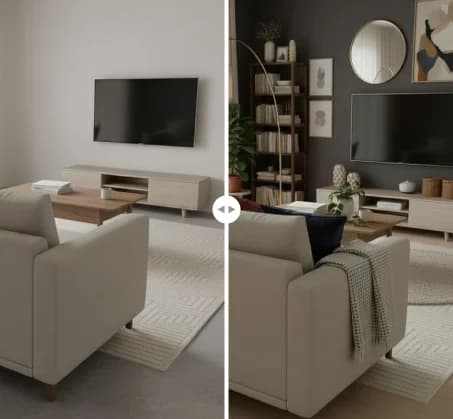
See RenoAI Come to Life in Your Space
Upload your room image and preview bold geometry, rich finishes, and timeless elegance before making any design decisions.
Preview RenoAI NowTable of Contents
- RenoAI vs RoomGPT: A Quick Comparison
- How Do RenoAI and RoomGPT Work?
- What Can You Create With RenoAI and RoomGPT?
- Is RenoAI Better Than RoomGPT?
- What Is the Best Alternative to RoomGPT?
- Which AI Interior Design Platform Is More Accurate?
- Can RenoAI Generate Professional-Quality Renders?
- Which AI Design Tool Is Best for Interior Designers?
- Which Platform Offers Better Image Quality and Realism?
- How Much Customization Do RenoAI and RoomGPT Offer?
- Which Platform Is Easier to Use?
- Which Platform Offers Better Value?
- RenoAI vs RoomGPT: Final Verdict
- Frequently Asked Questions

Frequently
Asked Questions
Have questions about RenoAI vs RoomGPT: Which AI Interior Design Platform Is Better in 2026?? We answer them here
RoomGPT focuses on transforming interior photographs into different visual themes. RenoAI supports photos, text, sketches, floor plans, elevations, sections, CAD drawings, and 3D model screenshots. RenoAI also includes tools for exteriors, landscapes, furniture, walls, lighting, decluttering, custom styles, image enhancement, and upscaling.
Start Designing with RenoAI for Free
Get 50 free credits to create up to 2 AI-generated design images in just 30 seconds.
No credit card required. No long setup. Just upload your space and start visualizing instantly.

- 50 Free Credits
- Generate up to 2 images
- No credit card required

- Unlimited design exploration
- Higher usage, faster workflow
- Built for serious design needs

Ready to Visualize More Than One Room Idea?
Explore interiors, exteriors, landscapes, floor plans, sketches, and architectural concepts using RenoAI’s complete visualization toolkit.
Start Designing with RenoAI