
How to Use AI to Redesign Your Bedroom in Minutes- Step-by-Step Guide
Redesigning a bedroom can feel confusing when you have too many ideas but no clear picture of the final look. You may like a wall color, furniture style or layout online but it is hard to know if it will suit your own room.

This is where an AI bedroom design tool makes the process easier. You can upload your bedroom photo, choose a style, test colors, change furniture, remove clutter and see realistic design ideas within minutes. If you want to know how to redesign bedroom online this guide will help you follow each step clearly.
Why Use AI for Bedroom Redesign?
Your bedroom is personal. It is where you rest, recharge, work sometimes, read, get ready & escape from the noise of the day. So, redesigning it should not be based on guesswork.
With AI interior design tools, you can quickly see how your room might look in different styles, such as modern, Japandi, Scandinavian, luxury, minimalist, boho, cozy or hotel-inspired. Instead of imagining the result, you can preview it visually.
AI is especially useful when you want to-
- Test wall colors before painting
- Try new furniture arrangements
- Visualize a complete bedroom makeover using AI
- Remove unwanted objects from a room photo
- Explore lighting, flooring, bedding & décor ideas
- Create mood-board-like visuals from your actual room
- Plan small bedroom redesigns without wasting space
Some AI room design apps allow users to upload a bedroom photo and create realistic redesign options within moments, while others support more advanced edits like changing flooring, restyling furniture or removing objects from the image.
Read More: How to Use RenoAI: Step-by-Step Guide
Step-by-Step Guide to Redesign Your Bedroom with AI
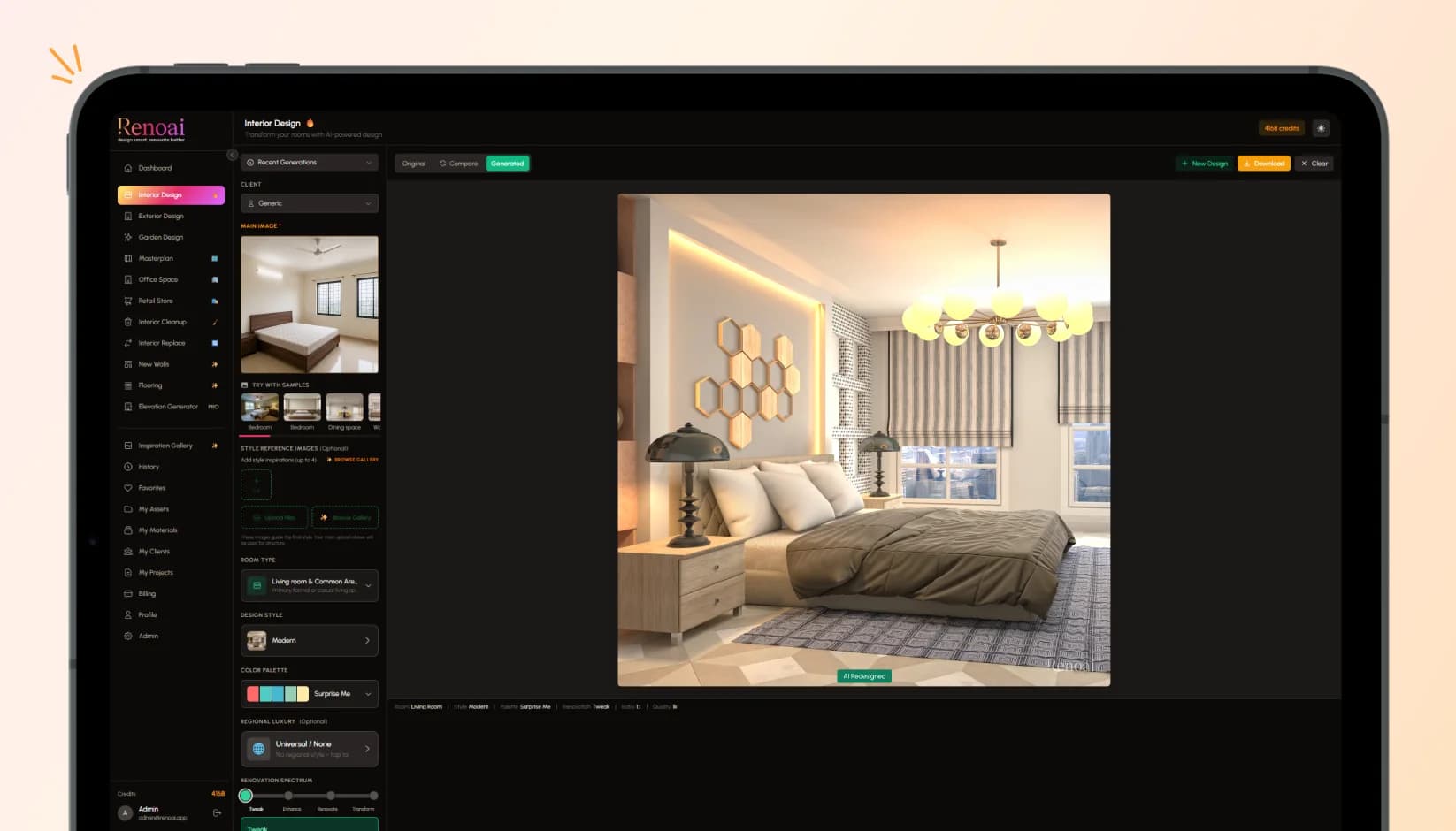
Here are the simple steps to redesign your bedroom with AI, from uploading a photo to choosing your final makeover style.
1. Take a Clear Photo of Your Bedroom
The first step is simple- take a clean, well-lit photo of your bedroom.
Stand in a corner or doorway so the AI can understand the room’s structure. Try to capture the bed, windows, walls, flooring, wardrobe, side tables & available walking space in one frame. Natural daylight works best because it helps the AI detect colors, shadows & layout more clearly.
Before uploading the image, remove unnecessary clutter from visible surfaces. You do not need to make the room perfect, but clothes, wires, water bottles & random items can confuse the AI and affect the design output. A clear photo helps the tool create better and more realistic bedroom design ideas.
This is also why photo-based AI design tools are becoming popular. They do not start from a blank template. They work from your real space, which makes the output more practical than generic design inspiration.
2. Choose the Right AI Bedroom Design Tool
The best AI home design tool bedroom users should choose depends on what they want to do.
If you only want quick inspiration, a simple AI room design app free version may be enough. Many tools provide free trials, starter credits or limited free generations. If you want detailed control, look for a tool that allows style selection, object replacement, flooring changes, wall color changes, furniture restyling & prompt-based edits.
For example, RenoAI focuses on uploading a space and editing it with instructions such as changing wall colors, swapping flooring, restyling furniture or removing objects from one screen. That type of workflow is useful when you want more control than a basic one-click redesign.
In 2026, the best AI bedroom design tool is not simply the one with the fanciest visuals. It is the one that gives you a balance of realism, customization, ease of use & practical outputs. A beautiful image is helpful, but a useful design should also respect your room’s actual size, windows, doors & layout.
3. Select Your Bedroom Style
Once your photo is uploaded, choose the design style you want to explore.
This is where AI becomes fun. You can redesign the same bedroom in multiple directions within minutes. A small plain bedroom can become a warm minimalist retreat, a luxury hotel-style suite, a soft boho space, a modern bachelor room or a calm Japandi-inspired setup.
Popular bedroom styles you can try include-
- Modern minimalist
- Scandinavian
- Japandi
- Luxury hotel-inspired
- Cozy neutral
- Bohemian
- Industrial
- Contemporary
- Earthy natural
- Smart compact bedroom
When using an AI bedroom design tool, avoid choosing a style only because it looks trendy. Think about how you actually use the room. Do you need better sleep? More storage? A work corner? Softer lighting? A calmer color palette? The best AI-generated bedroom design should support your lifestyle, not just look good on screen.
4. Add a Clear Prompt for Better Results
Most AI design tools perform better when your instruction is specific.
Instead of writing-
“Make my bedroom beautiful.”
Try writing-
“Redesign this bedroom in a warm minimalist style. Keep the bed near the same wall, use beige and white tones, add soft lighting, wooden side tables, layered bedding & a small reading corner near the window.”
This gives the AI more direction. You can mention colors, furniture, mood, layout, lighting, materials & what should stay unchanged.
A good prompt can include-
- Preferred style
- Color palette
- Furniture type
- Lighting mood
- Storage needs
- Items to remove
- Items to keep
- Budget-friendly direction
- Room purpose
This is how you can redesign bedroom with AI in a more controlled way. The clearer your input, the better the output.
5. Generate Multiple Bedroom Makeover Options
Do not stop at the first design.
AI tools are useful because they let you explore multiple versions quickly. Generate at least 3 to 5 bedroom concepts. Compare them side by side and look beyond the visual appeal.
Ask yourself-
- Does the design make the room feel bigger?
- Is the lighting practical?
- Can the furniture actually fit?
- Does the color palette match my taste?
- Is the room easier to clean and maintain?
- Does it improve comfort and movement?
A bedroom makeover using AI should help you make smarter decisions. Maybe one version has the perfect wall color. Another has a better furniture layout. A third has the right lighting mood. You can combine ideas from different outputs instead of copying one design exactly.
6. Customize Walls, Flooring, Furniture & Décor
Once you like a direction, refine it.
This is where a more advanced AI interior design bedroom tool becomes useful. You can try changing the wall color, replacing the bed frame, adding a rug, switching wooden flooring, testing curtains, removing bulky furniture or adding new lamps and artwork.
If your bedroom is small, use AI to test lighter wall colors, built-in storage, floating shelves, sliding wardrobes & compact bedside tables. AI tools can work well for small bedroom redesigns because they help you visualize space-saving ideas before buying anything.
For larger bedrooms, try zoning. You can ask the AI to add a reading chair, vanity corner, work desk, lounge area or TV wall while keeping the room balanced.
7. Check Realism Before Making Changes
AI-generated designs are helpful, but they are not construction drawings. Treat them as visual guidance, not final technical plans.
Before buying furniture or starting renovation work, check-
- Actual room measurements
- Bed and wardrobe dimensions
- Door and window clearance
- Electrical switch points
- Lighting placement
- Walking space
- Storage requirements
- Budget
AI can create realistic bedroom design ideas from photos, but accuracy depends on the image quality, prompt clarity & tool capability. Some tools may occasionally change proportions, add unrealistic furniture or ignore small architectural details. So, use AI for ideation and visualization, then verify everything practically.
8. Save Your Final Design and Create an Action Plan
Once you finalize a design direction, save the image and break it into an action plan.
For example-
- Week 1- Declutter and measure the room
- Week 2- Paint or wallpaper one wall
- Week 3- Buy bedding, curtains & lighting
- Week 4- Add storage, décor, plants & final styling
This makes the redesign easier and less overwhelming. You do not have to transform the whole bedroom in one day. AI gives you the vision. Your action plan turns it into reality.
Read More: How RenoAI Interior Design Tools Are Changing Home Renovation in 2026?
What to Expect After Generating Your Bedroom Design
Once your first AI bedroom design is ready, do not treat it as the final answer right away. Look at the layout, wall colors, furniture placement, lighting & overall mood. Some results may feel close to your vision, while others may only give you one useful idea.
Most AI bedroom designs are generated within seconds or a few minutes. However, a better result usually takes 20 to 30 minutes because you may test different styles, adjust prompts, compare versions & refine the final concept.
The process is still much faster than traditional design planning, but your input makes the biggest difference.
Free vs Paid AI Bedroom Design Tools
Many AI room design tools offer free trials, starter credits or limited design generations. These free options are useful when you want to test basic ideas, explore styles or see how your bedroom might look after a quick makeover.
For more serious redesign planning, paid features may be helpful. High-resolution exports, advanced customization, object removal, furniture replacement, flooring changes & unlimited generations are often part of premium plans. So, start free if you are exploring, then upgrade only when you need detailed design control.
Final Thoughts: Bedroom Redesign with AI
Using AI to redesign your bedroom is one of the easiest ways to explore ideas before making real changes. You can upload a photo, test multiple styles, change colors, replace furniture, improve lighting & visualize your dream room without guessing.
The biggest benefit is confidence. You no longer have to wonder if a dark accent wall will feel too heavy, if wooden flooring will match your furniture or if a minimalist layout will make your bedroom feel empty. With the right AI bedroom design tool, you can see those options first.
For anyone planning a quick refresh, rented-room upgrade, small bedroom redesign or complete makeover, AI makes the process faster, easier & far more visual.
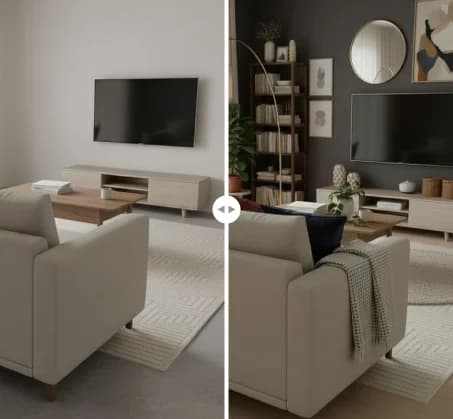
See RenoAI Come to Life in Your Space
Upload your room image and preview bold geometry, rich finishes, and timeless elegance before making any design decisions.
Preview RenoAI Now
Frequently
Asked Questions
Have questions about How to Use AI to Redesign Your Bedroom in Minutes- Step-by-Step Guide? We answer them here
Start by taking a clear bedroom photo, upload it to an AI design tool, choose your preferred style, add a detailed prompt, generate design options, refine furniture, colors, flooring & décor, then save the final concept for execution.
Start Designing with RenoAI for Free
Get 50 free credits to create up to 2 AI-generated design images in just 30 seconds.
No credit card required. No long setup. Just upload your space and start visualizing instantly.

- 50 Free Credits
- Generate up to 2 images
- No credit card required

- Unlimited design exploration
- Higher usage, faster workflow
- Built for serious design needs

Redesign Any Space Before You Start Renovating
Explore interiors, exteriors, layouts, colors, and design styles instantly with RenoAI’s AI visualization platform.
Try RenoAI Now